Tampilkan postingan dengan label sql server. Tampilkan semua postingan

Rabu, 08 Januari 2014

System Functions used to Query System Tables in Sql Server: SQL Programming

In SQL Programming, system functions are used to query on system tables. Programmer can easily perform all type of system functions to generate sequential numbers for each row based on specific criteria.

The system functions are used to query the system tables. System tables are a set of tables that are used by the SQL Server to store information about users, databases, tables and security. The system functions are used to access the SQL Server databases or user-related information. For example, to view the host ID of the terminal on which you are logged onto, you can use the following query:

SELECT host_id ( )

The following table lists the system function provided by SQL Server

  • host_id (), Returns the current host process ID number of a client process
  • host_name (), Returns the current host computer name of a client process
  • suser_sid ([‘login_name’]), Returns the security identification (SID) number corresponding to the log on name of the user
  • suser_id ([‘login_name’]), Returns the log on identification (ID) number corresponding to the log on name of the user
  • suser_sname ([server_user_id]), Returns the log on name of the user corresponding to the security identification number
  • user_id ([‘name_in_db’]), Returns the database identification number corresponding to the user name
  • user_name ([user_id]), Returns the user name corresponding to the database identification number
  • db_id ([‘db_name’]), Returns the database identification number of the database
  • db_name ([db_id]), Returns the database name
  • object_id (‘objname’), Returns the database object ID number
  • object_name (‘obj_id), Returns the database object name


Sabtu, 04 Januari 2014

Ranking Functions to Generate Sequential Numbers in Sql Server: SQL Programming

In SQL Programming, ranking functions are used to operate with numeric values. Programmer can easily perform all type of ranking functions to generate sequential numbers for each row based on specific criteria.

You can use ranking functions to generate sequential numbers for each row or to give a rank based on specific criteria. For example, in a manufacturing organization, the management wants to rank the employees based on their salary. To rank the employees, you can use the rank function.

Ranking function return a ranking value for each row. However, based on the criteria, more than one row can get the same rank. You can use the following functions to rank the records:
  • row_number
  • rank
  • dense_rank
All these functions make use of the OVER clause. This clause determines the ascending or descending sequence in which rows are assigned a rank. The row_number function returns the sequential numbers, starting at 1, for the rows in a result set based on a column.

For example, the following SQL query displays the sequential number on a column by using the row_number function:

SELECT BusinessEntityID, Rate, row_number ( ) OVER (ORDER BY Rate desc) AS RANK 
FROM HumanResources.EmployeePayHistory

The following figure displays the output of the preceding query.

Ranking Functions to Generate Sequential Numbers in Sql Server: SQL Programming

dense_rank Function

The dense_rank( ) function is used where consecutive ranking values need to be given based on a specified criteria. It performs the same ranking task as the rank function, but provides consecutive ranking values to an output.

For example, you want to rank the products based on the sales done for that product during a year. If two products A and B have same sale values, both will be assigned a common rank. The next product in the order of sales values, both will be assigned a common rank. The next product in the order of sales values would be assigned the next rank value.

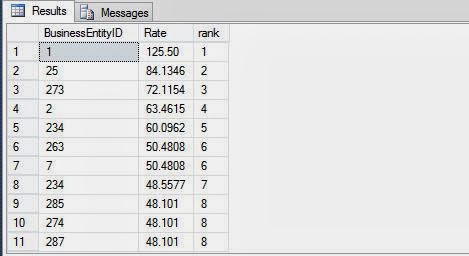
If in the preceding example of the rank function, you need to give the same rank to the employees with the same salary rate and the consecutive rank to the next one. You need to write the following query:

SELECT BusinessEntityID, Rate, dense_rank( ) OVER (ORDER BY Rate desc) AS rank 
FROM HumanResources.EmployeePayHistory

Ranking Functions to Generate Sequential Numbers in Sql Server: SQL Programming

Senin, 30 Desember 2013

Mathematical Functions to Work with Numerical Values in Sql Server: SQL Programming

In SQL Programming, mathematical functions are used to operate with numeric values. Programmer can easily perform all type of scientific functions as well as simple arithmetic operations using these mathematical functions.

Programmer can use mathematical functions to manipulate the numeric values in a result set. You can perform various numeric and arithmetic operations on the numeric values. For example, you can calculate the absolute value of a number or you can calculate the square or square root of a value.

The following table lists the mathematical functions provided by SQL Server 2005.

  • Abs, Returns an absolute value
  • Acos, asin and atan, returns the angle in radians whose cosine, sine, or tangent is a floating-point value
  • Cos, sin, cot and tan, returns the cosine, sine, cotangent, or tangent of the angle in radians
  • Degrees, returns the smallest integer greater than or equal to the specified value
  • Exp, returns the exponential value of the specified value
  • Floor, returns the largest integer less than or equal to the specified volume
  • Log, returns the natural logarithm of the specified value
  • Log10, returns the base-10 logarithm of the specified value
  • Pi, returns the constant value of 3.141592653589793
  • Power, returns the value of numeric_expression to the value of y
  • Radians, converts from degrees to radians
  • Rand, returns a random float number between 0 and 1
  • Round, returns a numeric expression rounded off to the length specified as an integer expression
  • Sign, returns positive, negative, or zero
  • Sqrt, returns the square root of the specified value
For example, to calculate the round off value of any number, you can use the round mathematical function. The round mathematical function calculates and returns the numeric value based on the input values provided as an argument.

The syntax of the round function is:
round (numeric_expression, length)

where

  • numeric_expression is the numeric expression to be rounded off.
  • Length is the precision to which the expression is to be rounded off.
The following SQL query retrieves the EmployeeID and Rate for a specified employee id from the EmployeePayHistory table:

SELECT BusinessEntityID, 'Hourly Pay Rate' = round (Rate, 2)
FROM HumanResources.EmployeePayHistory WHERE BusinessEntityID =3

In the result set, the value of the Rate column is rounded off to two decimal places.

Mathematical Functions to Work with Numerical Values in Sql Server: SQL Programming

While using the round function, if the length is positive, then the expression is rounded to the right of the decimal point. If the length is negative then the expression is rounded to the left of the decimal point. SQL Server provides the following usage of the round function.

  • Round (1234.567, 2) outputs 1234.570
  • Round (1234.567, 1) outputs 1234.600
  • Round (1234.567, 0) outputs 1235.000
  • Round (1234.567, -1) outputs 1230.000
  • Round (1234.567, -2) outputs 1200.000
  • Round (1234.567, -3) outputs 1000.000

Use Date Functions to Operate with Date Values in Sql Server: SQL Programming

In SQL Programming, programmer can use the date functions of the SQL Server to manipulate date-time values. You can either perform arithmetic operations on date values or parse the date values. Date parsing includes extracting components, such as the day, the month, and the year from a date value.

Programmer can also retrieve the system date and use the value in the date manipulation operations. To retrieve the current system date, you can use the getdate function. The following statement displays the current date:

SELECT getdate ( )

The following SQL query uses the datediff function to calculate the difference between the current date and the date of birth of employees in AdventureWorks, Inc. The date of birth of employees is stored in the BirthDate column of the Employee table.

SELECT datediff (yy, BirthDate, getdate()) AS 'Age'
FROM HumanResources.Employee

Outputs:

Use Date Functions to Operate with Date Values in Sql Server: SQL Programming

The following table lists the date functions provided by SQL Server.

  • dateadd, adds the number of date parts to the date
  • datediff, calculates the number of date parts between two dates
  • datename, returns date part from the listed date, as a character value (for example, October)
  • datepart, returns date part from the listed date as an integer
  • getdate(), returns the current date and time, day, (date), returns an integer, which represents the day getutcdate, returns the current date of the system in Universal Time Coordinate (UTC) time. UTC time is also known as the Greenwich Mean Time (GMT)
  • month, returns an integer, which represents the month
  • year, returns an integer which represents the year

SQL Server provides the following abbreviation and values of the datepart function

  • Year, Abbreviation -- (yy,yyyy),  may have values (1753-9999)
  • Qartr, Abbreviation -- (qq, q), may have values (1-4)
  • Month, Abbreviation -- (mm, m), may have values (1-12)
  • Day of year, Abbreviation -- (dy, y), may have values (1-366)

Kamis, 26 Desember 2013

Use String Functions to Manipulate String Values in Sql Server: SQL Programming

In Sql Programming, programmer can use the string functions to manipulate the string values in the result set. There are list of string functions used in sql server and explained in this article. For example, to display only the first eight characters of the values in a column, you can use the left ( ) string function.

String functions are used with the char and varchar data types. The SQL Server provides string functions that can be used as a part of the character expression. These functions are used for various operations on string.

Syntax:
    SELECT function_name (parameters)

Where
  • Function_name is the name of the function
  • parameters are the required parameters for the string function.
The following table lists the string functions provided by SQL Server
  • Ascii, returns the ASCII code of the leftmost character, e.g. SELECT ascii (‘ABC’) will return ascii code of 'A'.
  • Char, return the character equivalent of the ASCII code value, e.g. SELECT char (65)   
  • Charindex, returns the starting position of the specified pattern in the expression e.g. SELECT charindex (‘E’, ‘HELLO’)
  • Difference, compares two strings and evaluates the similarity between them, returning a value from 0 through 4. The value 4 is the best match e.g. SELECT difference (‘HELLO’, ‘hell’)
  • Left, returns apart of the character string equal in size to the integer_expression    characters from the left e.g. SELECT left(‘RICHARD’, 4) will return RICH
  • Len, returns the number of characters in the character_expression e.g. SELECT len(‘RICHARD’)
  • Lower, returns after converting character_expression to lower case e.g. SELECT lower (‘RICHARD’)
  • Ltrim, removes leading blanks from the character expression e.g. SELECT ltrim (‘RICHARD’)
  • Patindex, returns staring position of the first occurrence of the pattern in the specified expression, or zeros if the pattern is not found e.g. SELECT patindex (‘%BOX%’, ‘ACTIONBOX’)
  • Reverse, returns reverse of the character_expression e.g. SELECT reverse (‘ACTION’)
  • Right, returns a part of the character string, after extracting from the right the number of characters specified in the integer_expression e.g. SELECT right (‘RICHARD’, 4) will return HARD
  • Rtrim, returns after removing any trailing blanks from the character expression e.g. SELECT rtrim (‘RICHARD   ’)
  • Space, spaces are inserted between the first and second word e.g. SELECT ‘RICHARD’+space (2)+’HILL’, will add two spaces between 1st and 2nd word.
  • Str, converts numeric data to character data where the length is the total length, including the decimal point, the sign, the digits, and the spaces and the decimal is the number of places to the right of the decimal point e.g. SELECT str (123.45, 6, 2)
  • Stuff, deletes the number of characters as specified in the character_expression1 from the start and then inserts char_expression2 into character_expression1 at the start position e.g. SELECT stuff (‘Weather’, 2,2, ‘I’) will returns ‘wither’.
  • Substring, returns the part of the source character string from the start position of the expression e.g. SELECT substring (‘weather’, 2,2) will return ‘ea’.
  • Upper, converts lower case characters to upper case e.g. SELECT upper (‘Richard’)

The following SQL query uses the upper string function to display data in uppercase. The Name, DepartmentID, and GroupName columns are retrieved from the Department table and the data of the Name column is displayed in uppercase with a user-defined heading, Department Name:
 
SELECT 'Department Name' = upper (Name), DepartmentID, GroupName
FROM HumanResources.Department

 
Outputs:

Use String Functions to Manipulate String Values in Sql Server: SQL Programming

How to Customize the Result Set using Functions in SQL Server: SQL Programming

SQL server provides some in-built functions to hide the steps and the complexity from other code. Generally in sql programming, functions accepts parameters, perform some actions and return a result.

While querying data from SQL Server, programmer can use various in-built functions to customize the result set. Some of the changes includes changing the format of the string or date values or performing calculations on the numeric values in the result set. For example, if you need to display all the text values in uppercase, you can use the upper () string function. Similarly, if you need to calculate the square of the integer values, you can use the power ( ) mathematical function.

Depending on the utility, the in-built functions provided by SQL Server are categorized as listed below:
All these functions are for specific use in sql programming like string functions are used to manipulate the string in result set, to manipulate date values date functions are used, as so on. Arithmetic operations can also be performed with these functions like add, subtract operations on any of the above listed type of functions.

Functions can be easily used anywhere in the sql programming to build the software composable. Programmer can use these functions in constraints, computed columns, where clauses even in other functions. Overall the result, functions are powerful part in sql server.

Further article will describe about the use and example of above listed functions.

Jumat, 20 Desember 2013

Steps to Retrieve Records with SQL Server Management Studio: SQL Programming

As I have discussed in my first SQL article that the database scenario is AdventureWorks, on which we will work on. The AdventureWorks database is stored on the LocalDb (Currently used) database server. The problem we are sorting out is, the details of the sales persons are stored in the SalesPerson table. The management wants to view the details of the top three sales persons who have earned a bonus between $4,000 and $6,000.

To retrieve the specified records, programmer need to create a query first and then execute the query to generate the report. To display the top three sales person records from the SalesPerson table, programmer need to use the TOP keyword. In addition, to specify the range of bonus earned, you need to use the BETWEEN range operator.

To create the query by using the SQL Server Management Studio, just follow simple steps written below:
  • Select Start>Programs>SQL Server Management Studio to display the Microsoft SQL Server Management Studio Window. Connect to Server dialog box is displayed by-default, if not you can simple open it from File>Connect Object Explorer.
  • Select the server name from the Server name drop-down list.

    Steps to Retrieve Records with SQL Server Management Studio: SQL Programming
    Note: Name of the server is computer specific. In this example, the name of the server is (LocalDb)\v11.0. You can use the default server as the database server.
  • Fill the details as given in the image and click on Connect button. It will connect to the server and management studio will be displayed as shown in the image.

    Steps to Retrieve Records with SQL Server Management Studio: SQL Programming
  • Expand the Databases node and it will show all the databases on this server. Now right click on AdventureWorks2012 database and select New Query.
  • Name of the Query Editor window is specific to machine.
  • Type the following query in the Query Editor window:
SELECT TOP 3 *
FROM [AdventureWorks2012].[Sales].[SalesPerson]
Where Bonus BETWEEN 4000 AND 6000

  • Click on Execute (in SQL editor toolbar) or press F5 and check the result as shown in the following image:

Steps to Retrieve Records with SQL Server Management Studio: SQL Programming


Rabu, 18 Desember 2013

How to Retrieve Records without Duplication of Values: SQL Programming

Redundancy is each second programmer’s problem in querying with sql programming. Sql programming provides some in-built keyword that may be used to remove this problem. The article shows syntax and use of this keyword with examples.

When there is a requirement to eliminate rows with duplicate values in a column, the DISTINCT keyword is used. The DISTINCT keyword eliminates the duplicate rows from the result set.

The syntax of the DISTINCT keyword is:

SELECT [ALL|DISTINCT] column_names
FROM table_name
WHERE search_condition

Where

  • column_names: name of fields to be displayed in output.
  • table_name: name of table from which records are to be retrieved.
  • Search_condition: mostly used to filter the output.
  • DISTINCT keyword specifies that only the records containing non-duplicated values in the specified column are displayed.

In a query that contains the DISTINCT keyword, you can specify more than one column name. In that case, the DISTINCT keyword is applied to all the columns that are there in the select list. You can specify DISTINCT only before the select list. The following SQL query retrieves all the Titles beginning with PR from the Employee table:

SELECT DISTINCT JobTitle FROM HumanResources.Employee WHERE JobTitle LIKE 'PR%'

Output: The result contains all the records of employee table having PR, the starting two characters. The query will display only the JobTitle field, as specified in the query.

How to Retrieve Records without Duplication of Values: SQL Programming


How to Retrieve Records from Top of Table: SQL Programming

Sql Programming provides a specific keyword that enables programmer to retrieve records from the top of the table. Programmer can use the TOP keyword to retrieve only the first set of rows from the top of a table. This set of records can be either a number of records or a percent of rows that will be returned from a query result.

For example, you want to view the product details from the product table, where the product price is more than $50. There might be various records in the table, but you want to see only the top 10 records that satisfy the condition. In such a case, you can use the TOP keyword.

The syntax of using the TOP keyword in the SELECT statement is:

SELECT [TOP n{PERENT}] column_name [, column_name…]
FROM table_name
WHERE search_conditions
[ORDER BY [column_name [, column_name…]

Where

  • n is the number of rows that you want to retrieve.
  • If the PERCENT keyword is used, then ‘n’ percent of the rows are returned.
  • If the SELECT statement including TOP has an ORDER BY clause, then the rows to be returned are selected after the ORDER BY clause has been applied.

The following SQL query retrieves the top three records from the Employee table where the HireDate should be greater than or equal to 1/1/2002 and less than or equal to 12/31/2005. Further, the record should be displayed in the ascending order based on the SickLeaveHours column:

SELECT TOP 3 *
FROM HumanResources.Employee
WHERE HIreDate >= '1/1/2002' AND HireDate <= '12/31/2005'
ORDER BY SickLeaveHours ASC

Output: The result from the above sql query will be only top three records after satisfying the given condition.

 How to Retrieve Records from Top of Table: SQL Programming


How to Retrieve Records to be Displayed in a Sequence: SQL Programming

We have discussed many situations in which programmer retrieve records based on a condition. The purpose of this clause in sql programming, is not to verify the result, but to sort the result set. Using this clause, programmer can sort the records either in ascending or descending order.

Programmer can use the ORDER BY clause in the SELECT statement to display the data in a specific order. The order may be ascending and descending, depend on the requirement of query result.

The Syntax of the ORDER BY clause:

SELECT select_list
FROM table_name
[ORDER BY order_by_expression [ASC|DESC]
[, order_by_expression [ASC|DESC]…]

Where

  • Select_list: the list of field names to be displayed.
  • Table_name: name of table from which records are to be retrieved.
  • order_by_expression is the column name on which the sort is to be performed.
  • ASC specifies that the values need to be sorted in ascending order.
  • DESC specifies that the values need to be sorted in descending order.

Optionally, you can also specify multiple columns, if you want to sort the result set based on more than one column. For this, you need to specify the sequence of the sort columns in the ORDER BY clause.

The following SQL query retrieves the record from the Department table by setting ascending order on the Name column:

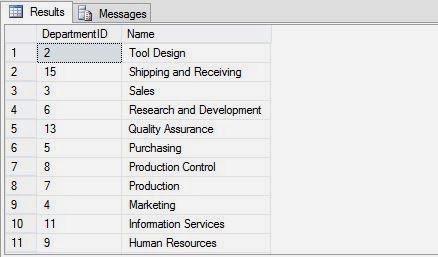
SELECT DepartmentID, Name FROM HumanResources.Department ORDER BY Name ASC

Output: in the output the records are sorted alphabetically in ascending order according to name as shown in the image.

How to Retrieve Records to be Displayed in a Sequence: SQL Programming


Now try the same query with DESC keyword.

SELECT DepartmentID, Name FROM HumanResources.Department ORDER BY Name DESC

Output: in the output the records are sorted alphabetically in descending order according to name as shown in the image.

How to Retrieve Records to be Displayed in a Sequence: SQL Programming

Note: If you do not specify the ASC or DESC keywords with the column name in the ORDER BY clause, the records are sorted in the ascending order.

Selasa, 17 Desember 2013

How to Retrieve Records containing Null Values: SQL Programming

In Sql programming, when programmer want to retrieve records that have null values in their columns. To get such type of records, sql queries must have NULL operator in the where clause.

A NULL value in a column implies that the data value for the column is not available. You might be required to find records that contain null values or records that do not contain NULL values in a particular column. In such a case, you can use the unknown_value_operator in your sql queries.

The syntax of using the unknown_value_operator in the SELECT query is:

SELECT column_list
FROM table_name
WHERE column_name unknown_value_operator

Where

  • Column_list: list of fields to be shown in output.
  • Table_name: from the records are to be retrieved.
  • unknown_value_operator is either the keyword IS NULL or IS NOT NULL.

The following SQL query retrieves only those rows from the EmployeeDepartmentHistory table for which value in the EndDate column is NULL.

SELECT BusinessEntityID, EndDate FROM
HumanResources.EmployeeDepartmentHistory WHERE EndDate IS NULL

There are few records falling in this category, shown in the output.

How to Retrieve Records containing Null Values: SQL Programming

Consider its opposite case, where some records have some date in the EndDate column.

SELECT BusinessEntityID, EndDate FROM
HumanResources.EmployeeDepartmentHistory WHERE EndDate IS NOT NULL

It will shows few records as shown in the output.

How to Retrieve Records containing Null Values: SQL Programming

How to Retrieve Records that Matches a Pattern: SQL Programming

When retrieving data in sql programming, you can view selected rows that match a specific pattern. For example, to create a report that displays all the product names of Adventure Works beginning with the letter P. This task can be done through the LIKE keyword.

The LIKE keyword is used to search a string by using wildcards. Wildcards are special characters, such as * and %. These characters are used to match patterns and some of them are described with example, mostly used by sql server:

  • %    Represents any string of zero or more character(s)
  • _    Represents a single character
  • []    Represents any single character within the special range
  • [^]    Represents any single character not within the specified range

The LIKE keyword matches the given character string with the specified pattern. The pattern can include combination of wildcard characters and regular characters. While performing a pattern match, regular characters must match the characters specified in the character string. However, wildcard characters are matched with fragments of the character string.

The following SQL query retrieves records from the Department table where the values of Name column begin with ‘Pro’. You need to use the ‘%’ wildcard character for this query.

SELECT * FROM HumanResources.Department WHERE Name LIKE 'Pro%'

Output: Shows all the records satisfy the given condition i.e. starting with Pro

How to Retrieve Records that Matches a Pattern: SQL Programming

The following SQL query retrieves the rows from the Department table in which the department name is five characters long and begins with ‘Sale’, whereas the fifth character can be anything. For this, you need to use the '_wildcard character.

SELECT * FROM HumanResources.Department WHERE Name LIKE 'Sale_'

Output: Shows all the records satisfy the given condition i.e. starting with having sale with single character.

How to Retrieve Records that Matches a Pattern: SQL Programming

Sabtu, 14 Desember 2013

How to Retrieve Records Containing any value from Set of Values: SQL Programming

List operators, in context of SQL programming, are used to compare a value to a list of literal values that have been specified. When field name must contain one of the values returned by an expression for inclusion in the query result, list operators comes in to existence.

Sometimes, you might want to retrieve data either within a given range or after specifying a set of values to check whether the specified value matches any data of the table. This type of operation is performed by using the IN and NOT IN keywords. The syntax of using the IN and NOT IN operators in the SELECT statement is:

SELECT column_list
FROM table_name
WHERE expression list_operator ('value_list')

Where

  • column_list: list of fields to be shown in output.
  • table_name: from the records are to be retrieved.
  • expression is any valid combination of constants, variables, functions, or column-based expressions.
  • list_operator is any valid list operator, IN or NOT IN.
  • value_list is the list of values to be included or excluded in the condition.

IN keyword selects values that match any one of the values in a list. The following SQL query retrieves records of employees who are Recruiters or Stockers from the Employee table:

SELECT BusinessEntityID, JobTitle, LoginID FROM HumanResources.Employee WHERE JobTitle IN ('Recruiter', 'Stocker')

 How to Retrieve Records Containing any value from Set of Values: SQL Programming


NOT IN keyword restricts the selection of values that match any one of the values in a list. The following SQL query retrieves records of employees whose designation is not Recruiter or Stocker:

SELECT BusinessEntityID, JobTitle, LoginID FROM HumanResources.Employee WHERE JobTitle Not IN ('Recruiter', 'Stocker')

 How to Retrieve Records Containing any value from Set of Values: SQL Programming

Retrieve records matches condition
Retrieve records within given range

How to Retrieve Records that contain values in Given Range: SQL Programming

Criteria is similar to a formula, a string that may consist of field references, operators and constants. We can tagged it an expression in sql programming. Sometimes this criteria have to be in range of values to let the programmer can select records within a range.

The article describes about these range operator that can access records within a given range e.g. list of students between ages 18yr to 25yr, list of employee having salary 10k to 20k. The inputted value may be a number, text or even dates. Mostly these range operator allows you to define a predicate in the form of a scope, if a column value falls in the specified scope, it got selected.

The Range operator retrieves data based on a range. The syntax for using the range operator in the SELECT statement is:

SELECT column_list
FROM table_name
WHERE expression1 range_operator expression2 AND expression3

Where

  • Column_list: list of fields to be shown in output.
  • Table_name: from the records are to be retrieved.
  • expression1, expression2, and expression3 are any valid combination of constants, variables, functions, or column-based expressions.
  • Range_operator is any valid range operator.

Here’re the range operators used in Sql programming

BETWEEN: Is used to specify a test range. It gives records specifying the given condition via sql query.
The following SQL query retrieves records from the Employee table when the vacation hour is between 20 and 50:

SELECT BusinessEntityID, VacationHours FROM HumanResources.Employee WHERE VacationHours BETWEEN 20 AND 50

How to Retrieve Records that contain values in Given Range: SQL Programming


NOT BETWEEN: Is used to specify the test range to which he values in the search result do not belong.
The following SQL query retrieves records from the Employee table when the vacation hour is not between 40 and 50:

SELECT BusinessEntityID, VacationHours FROM HumanResources.Employee WHERE VacationHours Not BETWEEN 20 AND 50

How to Retrieve Records that contain values in Given Range: SQL Programming

Retrieve records matches condition

Jumat, 13 Desember 2013

How to Retrieve Records based on One or More Condition: SQL Programming

Logical operators are used in the SELECT statement to retrieve records based on one or more conditions. While querying data in sql programming, programmer can combine more than one logical operator to apply multiple search conditions. As same as in comparison operator, the conditions specified by the logical operators are connected with the WHERE clause.

The syntax for using the logical operators in the SELECT

SELECT column_list
FROM table_name
WHERE conditional_expression 1 logical operator Conditional_expression 2

Where

  • column_list: list of fields to be shown in output.
  • table_name: from the records are to be retrieved.
  • conditional_expression 1 and conditional_expression 2 are any conditional expressions.
  • logical operator: any operator listed below.

Basically there are three types of logical operators in every computer programming. They are Or, And & Not, described below with example.

OR: Return a true value when at least one condition is satisfied. The following SQL query retrieves records from the Department table when the GroupName is either Manufacturing or Quality Assurance:

SELECT * FROM HumanResources.Department WHERE GroupName = 'Manufacturing' OR GroupName = 'Quality Assurance'

How to Retrieve Records based on One or More Condition: SQL Programming

AND: Is used to join two conditions and returns a true value when both the conditions are satisfied. For example, to view the details of all the employees of Adventure Works who are married and working as an Engineering Manager, you can use the AND logical operator, as shown in the following SQL query:

SELECT * FROM HumanResources.Employee WHERE Title = 'Engineering Manager' AND MaritalStatus = 'M'

How to Retrieve Records based on One or More Condition: SQL Programming


NOT: Reverses the result of the search condition. The following SQL query retrieves records from the Department table when the GroupName is not Manufacturing or Quality Assurance:

SELECT * FROM Humansources.Employee WHERE Title = 'Design Engineer' And NOT MaritalStatus = 'F'

The preceding query retrieves all the rows, except the rows that match the condition specified after the NOT conditional expression.

How to Retrieve Records based on One or More Condition: SQL Programming

Kamis, 12 Desember 2013

How to Use Comparison Operators to Specify Conditions: SQL Programming

Comparison operators test whether two expressions are same or not. These operators can be used on all the sql data types except some of them like text, ntext or image. Equal to, greater then, less than are such operators. The article will let you enable to use these operators with examples.

While arithmetic operators are used to calculate column values, Comparison operators test for similarity between two expressions. You can create conditions in the SELECT statement to retrieve selected rows by using various comparison operators. Comparison operators allow row retrieval from a table based on the condition specified in the WHERE clause. Comparison operators cannot be used on text, ntext, or image data type expressions.
The syntax for using the comparison operator in the SELECT statement is:

 SELECT column_list
 FROM table_name
 WHERE expressiona1 comparison_operator expression2

Where
  • column_list: list of fields to be shown in output.
  • table_name: from the records are to be retrieved.
  • expression1 and expression2: any expression on which the operator will be applied.
  • comparison_operator: may be one listed below.
The following SQL query retrieves records from the Employee table where the vacation hour is more than 20:
SELECT BusinessEntityID, NationalIDNumber, JobTitle, VacationHours FROM HumanResources.Employee WHERE VacationHours > 20

In the preceding example, the query retrieves all the rows that satisfy the specified condition by using the comparison operator. The result is shown in the following image:

How to Use Comparison Operators to Specify Conditions: SQL Programming

The SQL Server provides the following comparison operators.
  • =   Equal to
  • >   Greater than
  • <   Less than
  • >=   Greater than or equal to
  • <=   Less than or equal to
  • <>   Not equal to
  • !=   Not equal to
  • !<   Not less than
  • !>   Not greater than
Sometimes, you might need to view records for which one or more conditions hold true. Depending on the requirements, you can retrieve records based on the following conditions:

How to Retrieve Selected Rows and Calculating Column values: SQL Programming

All the programming languages uses operators to be executed some calculations on the data. In SQL programming there are also some arithmetic operators listed in the article. Using where clause, programmer can easily get selected records, in the query.

Calculating Column Values

Sometimes, you might also need to show calculated values for the columns. For example, the Purchasing.PurchaseOrderDetail table stores the order details such as PurchaseOrderID, ProductID, DueDate, UnitPrice, and ReceivedQty etc. To find the total amount of an order, you need to multiply the UnitPrice of the product with the ReceivedQty. In such scenarios, programmer have apply arithmetic operators.

Arithmetic operators are used to perform mathematical operations, such as addition, subtraction, division, and multiplication, on numeric columns or on numeric constants. As in earlier article + have also used to concatenate the output of sql query.

Here're some arithmetic operations SQL Server supports:

  • + used for addition
  • - used for subtraction
  • / used for division
  • * used for multiplication
  • % used for modulo – the modulo arithmetic operator is used to obtain the remainder of two divisible numeric integer values

All arithmetic operators can be used in the SELECT statement with column names and numeric constants in any combination.

When multiple arithmetic operators are used in a single query, the processing of the operation takes place according to the precedence of the arithmetic operators. The precedence level of arithmetic operators in an expression is multiplication (*), division (/), modulo (%), subtraction (-), and addition (+). You can change the precedence of the operators by using parentheses (()). When an arithmetic expression uses the same level of precedence, the order of execution is from the left to the right.

The EmployeePayHistory table in the HumanResources schema contains the hourly rate of the employees. The following SQL query retrieves the per day rate of the employees from the EmployeePayHistory table:

SELECT BusinessEntityID, Rate, Per_Day_Rate = 8 * Rate FROM HumanResources.EmployeePayHistory

In the preceding example, Rate is multiplied by 8, assuming that an employee works for eight hours. The result is shown in the following image.

How to Retrieve Selected Rows and Calculating Column values: SQL Programming

Retrieving Selected Rows

In a given table, a column can contain different values in different records. At times, you might need to view only those records that match a specific value or a set of values. For example, in a manufacturing organization, an employee wants to view a list of products from the Products table that are priced between $100 and $200.

To retrieve selected rows based on a specific condition, you need to use the WHERE clause in the SELECT statement. Using the WHERE clause selects the rows that satisfy the condition. The following SQL query retrieves the department details from the Department table, where the group name is Research and Development:

SELECT * FROM HumanResources.Department WHERE GroupName = 'Research and Development'

The SQL Server will display the output of the query, as shown in the following figure.

How to Retrieve Selected Rows and Calculating Column values: SQL Programming

In the preceding example, rows containing the Research and Development group name are retrieved. Through the output window, it looks like there are only three records in the database satisfying the condition given above.


Selasa, 10 Desember 2013

Customizing and Concatenating Output in SQL Database: SQL Server

Sql Server Management Studio have some options to customizing the display like adding the literals in the sql query to change the column name in output. It also have an option to concatenate strings in records, selected by sql query in sql server. In this article we will do these tasks with some examples in sql.

Customizing the Display

Sometimes, you might be required to change the way the data is displayed on the output screen. For example, if the names of columns are not descriptive, you might need to change the column headings by creating user-defined headings.

Consider the following example that displays the Department ID and Department Names from the Department table of the Adventure Works database. The report should contain column headings different from those given in the table, as specified in the following format.

Department Number  Department Name

You can write the query in the following ways:

  • SELECT ‘Department Number’ – DepartmentID, ‘Department Name’ FROM HumanResources.Department
  • SELECT DepartmentID ‘Department Number’, Name ‘Department Name’ FROM HumanResources.Department
  • SELECT DepartmentID AS ‘Department Number’, Name AS ‘Department Name’ FROM HumanResources.Department

Similarly, you might be required to make results more explanatory. In such case, you can add more text to the values displayed by the columns by using literals. Literals are string values enclosed in single quotes and added to the SELECT statement. The literal value is printed in a separate column as they are written in the SELECT list. Therefore, literals are used for display purpose.

The following SQL query retrieves the department-Id and their name from the Department table and change the column header as specified in the query.

SELECT DepartmentID 'Department Number', Name 'Department Name'
FROM Department

The SQL Server will display the output of the query, as shown in the following figure

Customizing and Concatenating Output in SQL Database: SQL Server
Add caption

Concatenating the Text Values in the Output

As a database developer, you will be required to address requirements from various users, who might want to view results in different ways. You might be required to display the values of multiple columns in a single column and also to improve readability by adding a description with the column value. In this case, you can use the Concatenation operator. The concatenation operator is used to concatenate string expressions. They are represented by the + sign.

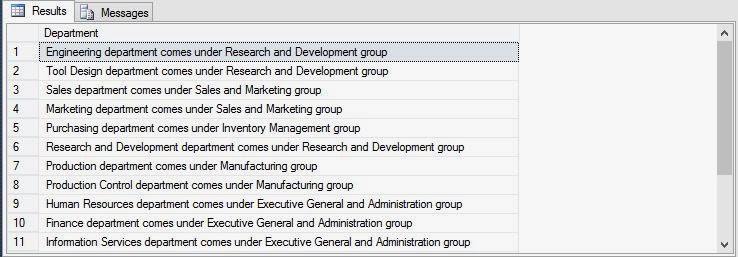
The following SQL query concatenates the data of the Name and GroupName columns of the Department table into a single column. Text values, such as “department comes under” and “group”, are concatenated to increase the readability of the output:

SELECT Name + ' department comes under ' + groupName + ' group' AS Department
FROM Department

When you execute the query, it will format the output according to above query. The SQL Server will display the output of the query, as shown in the following figure.

Customizing and Concatenating Output in SQL Database: SQL Server

Retrieving specific Records
Retrieve Selected Rows and Calculate Column values

How to Retrieve Specific Records by SQL Database: SQL Server

By-default when user fire a query on the sql database it provides all the columns in the output, the table have. Database developer can change the no. of columns, to be displayed in the output. Sql Server Management Studio provides some special features explained in the article.

Retrieving Specific Attributes

While retrieving data from tables, you can display one or more columns. For example, the Adventure Works database stores the department details, such as Name and GroupName in the Department table. Users might want to view single column such as Name. Programmer can retrieve the required data from the database tables by using the SELECT statement.

The SELECT statement is used for accessing and retrieving data from a database. The syntax of the SELECT statement is:

SELECT [ALL | DISTINCT] select_column_list
[INTO [new_table_name]]
[FROM {table_name |view_name}
[WHERE search condition]


Where
  • ALL: represented with an (*) asterisk symbol and displays all the columns of the table.
  • Select_column_list: name of the table from which data is to be retrieved.
Note:
The SELECT statement can contains some more arguments such as WHERE, GROUP BY, COMPUTE, and ORDER BY that will be explained in later articles. All the examples in this SQL related articles are based on the Adventure Works Database, and can be download from here.
Consider the department table stored in the HumanResources schema of the Adventure Works database. To display all the detail of employees, you can use the following query:
 

SELECT * FROM HumanResources.Department
 

Execute the query and SQL Server will display the output of the query, as shown in the following figure.

How to Retrieve Specific Records by SQL Database: SQL Server 
The result set displays the records in the order in which they are stored in the table. In other words the records are sorted in ascending order of DepartmentId that is primary key of the department table.
   
Note:

The number of rows in the output window may vary depending on the modifications done on the database.
If you need to retrieve specific columns, you can specify the column names in the SELECT statement. For example, to view specific details, such as only Name of the employees of AdventureWorks, you can specify the column names in the SELECT statement, as shown in the following SQL query:
   
SELECT DepartmentId, Name FROM HumanResources.Department

The SQL Server will display the output of the query, as shown in the following figure.


How to Retrieve Specific Records by SQL Database: SQL Server 
In the output, the result set shows the column names the way they are present in the table definition. You can customize these column names, if required. As same as in above sql query you can specify some more columns as per the requirements.

Customizing and Concatening display in SQL Server

Sabtu, 07 Desember 2013

Data Types used in SQL with Range: Introduction to SQL

+Pinal Dave  : As a database developer, you need to regularly retrieve data for various purposes, such as creating reports and manipulating data. You can retrieve data from the database server by using SQL queries.

In this article we will let you know how to retrieve selected data from database tables by executing the SQL queries. It will also explain to use functions to customize the result set as well as summarize and grouping data.

Retrieving Data

At times, the database developers might need to retrieve complete or selected data from a table. Depending on the requirements, you might need to extract only selected columns or rows from a table. Consider the example of an organization that stores the employee data in SQL Server database. At times, the users might need to extract only selected information such as name, data of birth and address details of all the employees. At other times, the users might need to retrieve all the details of the employees in the Sales and Marketing department.

Identifying Data types

Data type specifies the type of data that an object can contain, such as character data or integer data. You can associate a data type with each column, local variable, expression, or parameter defined in the database.

You need to specify the data type according to the data to be stored. For example, you can specify character as the data type to store the employee name, date time as the data type to store the hire date of employees. SQL Server 2005 supports the following data types.

Int:  ranges from (-) 2^31 to 2^31-1 and used to store Integer data (whole numbers)

Decimal: ranges from (-)10^38 +1 through 10^38-1 and used to store Numeric data types with a fixed precision and scale

Numeric: ranges from (-)10^38+1 through 10^38-1 and used to store  Numeric data types with a fixed precision and scale

Float: ranges from (-)1.79E+308to-2.23E-308,0 and 2.23E-308 to 1.79E+308 and used to store Floating precision data

Money: ranges from (-)922,203,685,477.5808 to 922,337,203,685,477.5807 and used to store monetary data

Datetime: ranges from January 1,1753, through December 31, 9999 and used to store Date and time data

Char(n): n characters, where n can be 1 to 8000 and used to store Fixed length character data

Varchar(n): n characters, where n can be 1 to 8000 and used to store Variable length character data

Text: Maximum length of 2^31-1(2,147,483,647) characters and used to store character string

Bit: 0 or 1 and used to store  Integer data with 0 or 1

Image: maximum length of 2^31-1(2,147,483,647) bytes and used to store  Variable length binary data to store images

Sql_variant: Maximum length of 8016 bytes Different data types except text, ntext, image, timestamp, and
sql_variant

Timestamp: maximum storage size of 8 bytes Unique number in a database that is updated every time a row that contains timestamp is inserted or updated

Uniqueidentifier: Is a 16-byte GUID A column or local variable of the uniqueidentifier data type can be initialized by either using the NEWID function or converting from a string constant in the form xxxxxxxx-xxxx-xxxx-xxxx-xxxxxxxxxxxx, where each x is a hexadecimal digit in the range 0-9 or a-f. For example, an unique identifier value is 6F9619FF-8B86-D011-B42D-00C04FC964FF

Table: Result set to be processed later

Xml: xml instances and xml type variables Store and return xml values

In the next article, we will discuss about how to fire a query to retrieve data from the database in sql server management studio.